Create Sub-Account
To create a new sub-account, do these steps:
- Select My-Sub Account from the sidebar menu.
- Click the +ACCOUNT button to display the Create New Account dialog box.
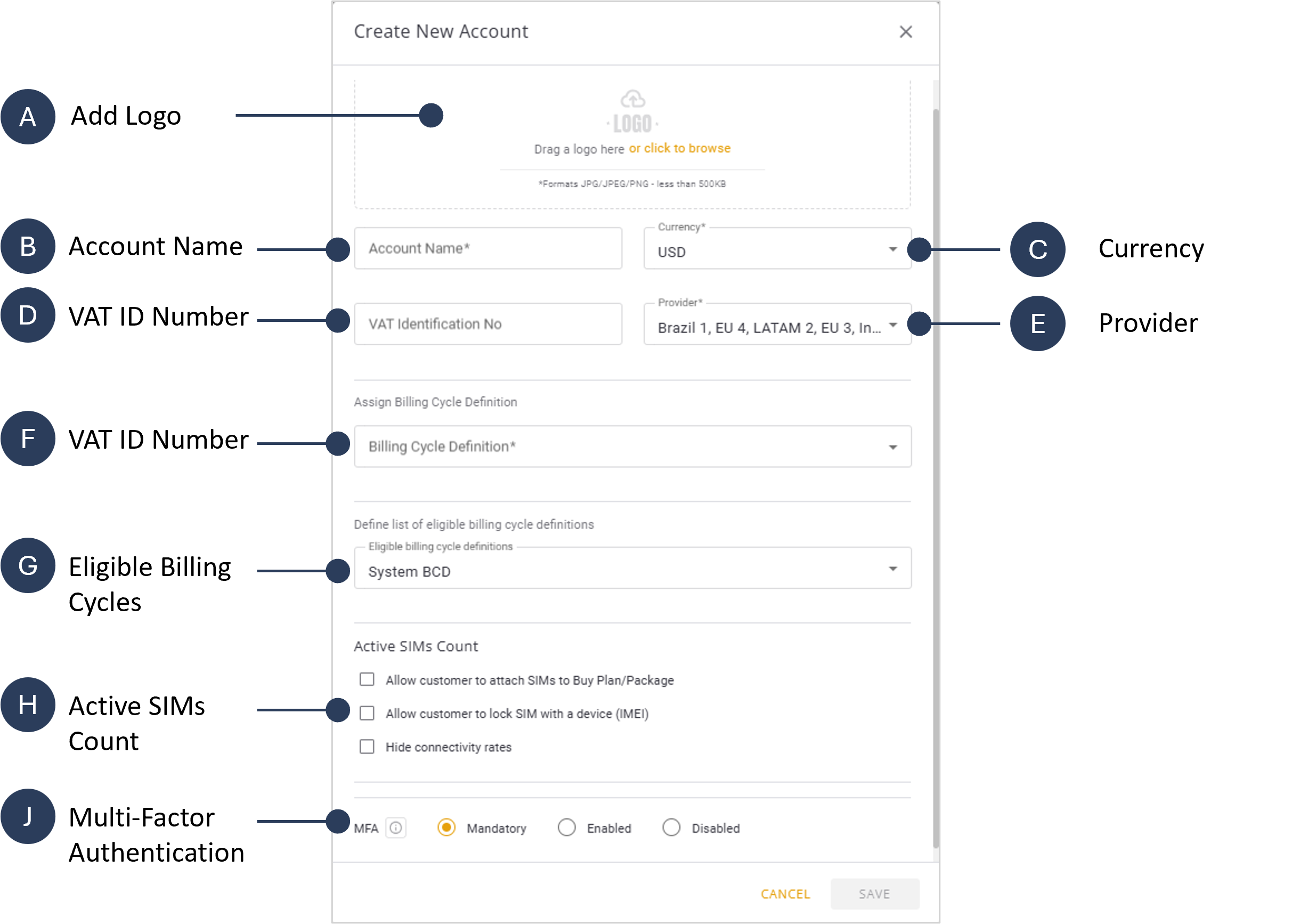
- Add a logo file for your sub-acount (optional).
- Type the new account name in the Account Name field.
- Click on Currency and select the account default currency used to invoice this new account (optional).
- Type your tax number in the VAT Identification No field (Optional).
- Select one or more options from the list of Providers.
- Select a Billing Cycle Definition from the list of options:
- System
- Monthly
- Daily.
- Check one or more items to Define a List of Eligible Billing Cycle Definitions.
- Select on or more of these Active SIMs Count options:
- Allow Customers to Attach SIMs to Buy Plan/Package.
- Allow Customer to Lock SIM with a Device
- Hide Connectivity Rate.
- Select one of these Mufti Factor Authentication MFA options:
- Mandatory: All sub-account user must use MFA Login method.
- Enabled: All sub-account user may use the MFA Login method.
- Disabled: MFA option is disabled for users of this sub-account.
- Click Save. The new sub-account is created and its index card appears on the My Sub-Accounts page.
Here is a screen capture of the Create New Account dialog box.